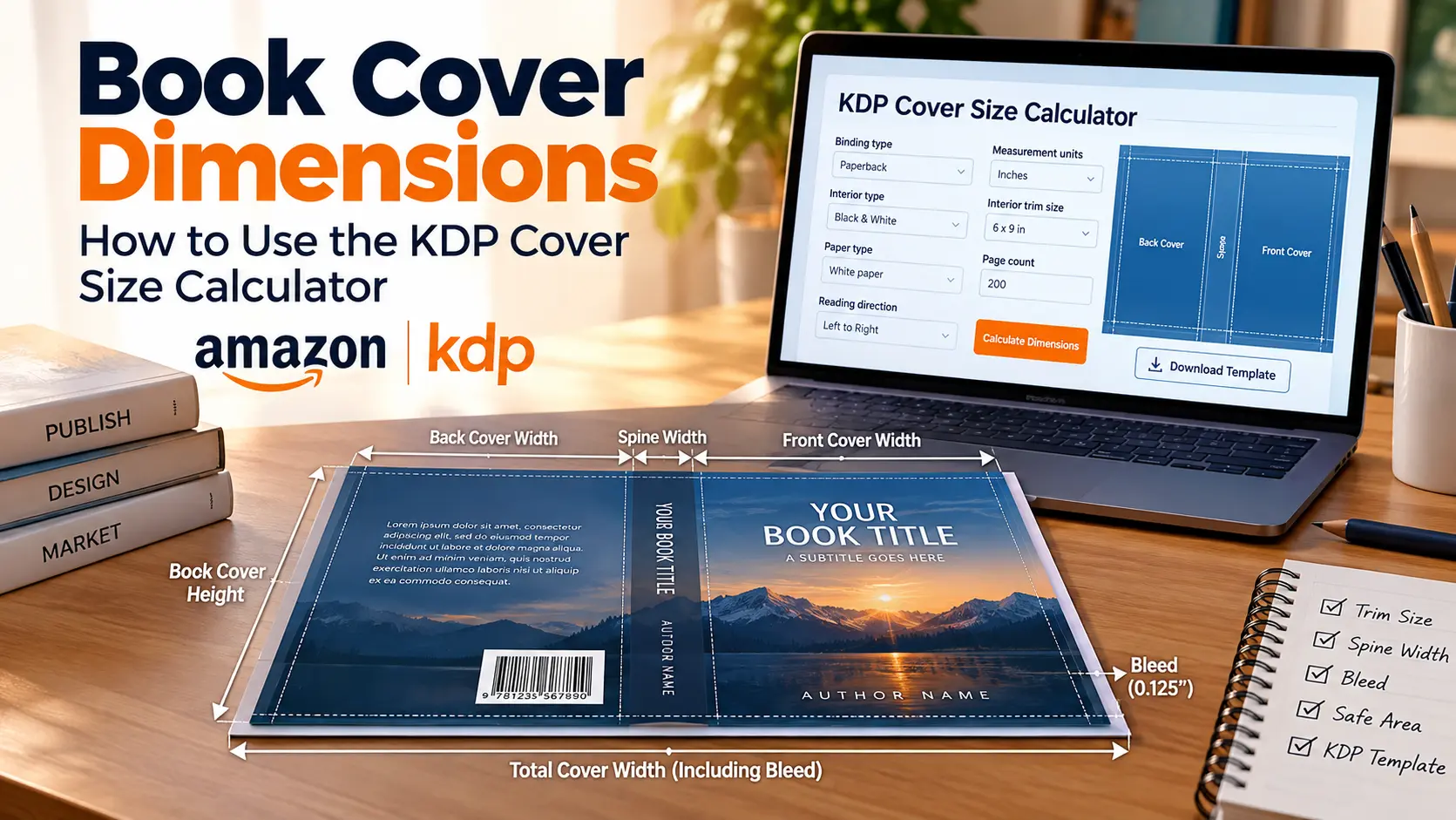
Finding the correct book cover dimensions is an essential step when preparing a print book for Amazon KDP. Your cover needs to include more than the front and back covers, it also needs space for the spine and required bleed.
The easiest way to determine the correct measurements is to use the official KDP kdp cover size calculator, also known as Amazon’s Print Cover Calculator and Templates tool. You enter your book specifications, and KDP generates the dimensions and a downloadable template.
Official KDP Print Cover Calculator and Templates
Quick Answer: How Do You Find Book Cover Dimensions?
To find your book cover dimensions, use the official Amazon KDP cover calculator and enter your binding type, interior type, paper type, reading direction, measurement units, trim size, and final page count.
The calculator then determines the dimensions of your complete print cover, including the back cover, spine, front cover, and bleed, and allows you to download a cover template.
This is important because your trim size is not the same as your complete cover size.
What Are Book Cover Dimensions?
Book cover dimensions refer to the overall size of the print-ready cover file.
For a paperback, the complete cover contains:
- Back cover
- Spine
- Front cover
- Bleed
KDP requires the paperback cover to be submitted as one PDF containing the back cover, spine, and front cover.
For example, if your finished book is 6 × 9 inches, you cannot simply create a 12 × 9-inch cover file. You also need to account for the spine and bleed.
What Is a KDP Cover Size Calculator?
A kdp cover size calculator is a tool that helps authors determine the correct dimensions for a print book cover based on the book’s specifications.
Amazon KDP provides an official Print Cover Calculator and Templates tool. The calculator currently asks for information such as:
- Binding type
- Interior type
- Paper type
- Reading direction
- Measurement units
- Interior trim size
- Page count
After you enter the information, KDP calculates the cover measurements and lets you download a template.
This makes the calculator particularly useful when designing a cover in Photoshop, InDesign, Affinity Publisher, Canva, or other design software.
How to Use the Amazon KDP Cover Calculator
The amazon kdp cover calculator is designed to make the cover-sizing process easier. Follow these steps to find the correct measurements for your book.
1. Select Your Binding Type
Start by selecting the type of book you’re publishing.
Depending on the format, KDP supports:
- Paperback
- Hardcover
Paperback and hardcover covers have different specifications, so make sure you select the correct format before calculating your dimensions.
2. Select Your Interior Type
For paperback books, KDP provides interior options such as:
- Black & White
- Premium Color
- Standard Color
Your interior selection can affect the applicable cover specifications.
3. Select Your Paper Type
For applicable paperback formats, select the paper type used for your interior.
KDP’s current paperback guidance includes white and cream paper options, with different spine-width calculations depending on the paper and interior type.
4. Choose Your Reading Direction
Select the appropriate reading direction:
- Left-to-right
- Right-to-left
KDP adjusts the generated cover layout according to the selected direction. For right-to-left books, the front cover is placed on the opposite side of the spine from a standard left-to-right layout.
5. Choose Your Measurement Units
The calculator lets you select your preferred measurement system:
- Inches
- Millimeters
Choose the unit that matches your design workflow.
6. Enter Your Trim Size
Your trim size is the final physical size of the printed book.
For example:
6 × 9 inches
is the most common paperback trim size in the United States according to KDP.
However, remember:
Trim size ≠ complete cover size
Your complete cover also needs space for the spine and bleed.
7. Enter Your Page Count
Enter the final page count of your formatted manuscript.
Page count is particularly important because it affects the spine width.
For example, a 100-page 6 × 9-inch book and a 300-page 6 × 9-inch book have the same trim size but different spine widths.
KDP’s calculator uses page count when generating the cover dimensions.
8. Calculate Your Dimensions
After entering all the information, click Calculate Dimensions.
KDP will provide measurements for the different cover elements and allow you to download a template.
What Is a KDP Book Size Calculator?
The phrase kdp book size calculator is often used to describe tools that help authors determine the appropriate dimensions for their KDP books.
However, it is important to distinguish between interior book size and cover size.
KDP provides different tools for different purposes. Its Print Cover Calculator and Templates tool is specifically designed to calculate paperback and hardcover cover measurements, while KDP also provides a separate file-setup calculator for paperback interior measurements.
If you’re trying to determine the size of your cover, use the official Print Cover Calculator and Templates tool.
Use the KDP Book Cover Calculator
Is Trim Size the Same as Book Cover Dimensions?
No.
Trim size describes the final physical dimensions of your printed book.
The complete cover file is larger because it includes:
Back Cover + Spine + Front Cover + Bleed
For a paperback, KDP provides this formula:
Cover Width = Bleed + Back Cover Width + Spine Width + Front Cover Width + Bleed
Cover Height = Bleed + Trim Height + Bleed
This is why you should use the calculator rather than simply doubling your trim width.
How Does Page Count Affect Book Cover Dimensions?
Page count primarily affects the spine width.
KDP currently provides different spine calculations depending on the paper/interior specification. For example, its paperback guidance lists separate calculations for white paper, cream paper, groundwood paper, and color books.
This means that changing your page count after creating your cover may require you to recalculate the entire cover width.
Example
Suppose you have:
Trim size: 6 × 9 inches
If your book changes from 150 pages to 250 pages, the front and back covers remain 6 × 9 inches, but the spine becomes wider.
Therefore, your total cover width changes.
How Much Bleed Does a KDP Cover Need?
KDP requires 0.125 inches (3.2 mm) of bleed on the top, bottom, and outside edges of paperback covers.
Bleed gives the printer additional artwork beyond the final trim line.
This is particularly important for:
- Full-page backgrounds
- Photography
- Illustrations
- Color backgrounds
- Patterns
Without sufficient bleed, trimming can potentially leave an unwanted white edge.
What Is the Safe Area on a KDP Cover?
The safe area is the part of the cover where important text and graphics should remain.
KDP recommends keeping content that shouldn’t be trimmed at least 0.25 inches (6.4 mm) from the outside cover edge.
Keep important elements such as:
- Book title
- Author name
- Subtitle
- Back-cover text
- Logos
- Important graphics
away from the trim and bleed areas.
Paperback vs. Hardcover Cover Dimensions
Paperback and hardcover covers don’t use identical specifications.
Paperback
A paperback cover consists of:
Back + Spine + Front + Bleed
KDP specifies the required bleed and provides formulas for calculating paperback cover dimensions.
Hardcover
Hardcover books use different cover construction and specifications.
Therefore, when using the amazon kdp cover calculator, make sure you select the correct binding type before downloading your template.
Why Use the Official KDP Cover Size Calculator?
You can manually calculate your dimensions, but the official kdp cover size calculator offers several advantages.
It reduces calculation errors
Instead of manually determining your spine width and complete cover dimensions, KDP calculates them from your book information.
It provides a design template
KDP allows you to download a PDF or PNG template that can be used as a guide layer in image-editing software.
It accounts for your specific book
The dimensions aren’t based solely on trim size. The calculator takes your selected specifications and page count into account.
When Should You Calculate Your Cover Dimensions?
Calculate your book cover dimensions after your interior manuscript is finalized.
A recommended workflow is:
Finalize manuscript → Confirm trim size → Confirm interior specifications → Confirm page count → Calculate cover dimensions → Download template → Design cover → Export PDF → Upload to KDP
This approach reduces the risk of having to redesign your cover because your page count or spine width changed.
KDP Cover Design Checklist
Before uploading your cover, check:
Book specifications
- Correct binding type
- Correct interior type
- Correct paper type
- Correct reading direction
- Correct trim size
- Final page count
Cover dimensions
- Correct total cover width
- Correct cover height
- Correct spine width
- Required bleed
- Safe area respected
Final PDF
- Front cover included
- Back cover included
- Spine included
- Correct dimensions
- Single PDF file
- Minimum 300 DPI for cover images
- Template guides removed before submission
KDP’s paperback guidance requires the cover to be a single PDF and recommends a minimum resolution of 300 DPI for cover images.
Frequently Asked Questions
What are book cover dimensions?
Book cover dimensions are the overall width and height of the print-ready cover file, including the front cover, back cover, spine, and required bleed.
What is a kdp cover size calculator?
A kdp cover size calculator is a tool used to determine the correct dimensions of a KDP print cover based on the book’s specifications and page count. Amazon provides an official Print Cover Calculator and Templates tool.
Where can I find the Amazon KDP cover calculator?
You can access the official amazon kdp cover calculator through KDP’s Print Cover Calculator and Templates page.
What is a kdp book size calculator?
A kdp book size calculator can refer to a tool used to determine book or cover measurements. For cover dimensions specifically, use KDP’s Print Cover Calculator and Templates tool. KDP also provides a separate file-setup calculator for paperback interiors.
Does page count affect book cover dimensions?
Yes. Page count affects the spine width, which can change the total width of your cover.
Is 6 × 9 inches the complete KDP cover size?
No. 6 × 9 inches is the trim size, not the complete cover spread. The complete cover also includes the spine and bleed.
How much bleed does a KDP paperback cover need?
KDP requires 0.125 inches (3.2 mm) of bleed on the top, bottom, and outside edges of a paperback cover.
Does KDP provide a cover template?
Yes. KDP’s Print Cover Calculator and Templates tool can generate a template based on your book specifications. The template can be downloaded as a guide for your cover design.
When should I calculate my cover size?
Calculate it after your interior manuscript and final page count are ready. This helps ensure that the spine measurement corresponds to your final book.
Final Thoughts
Getting the correct book cover dimensions doesn’t have to involve complicated manual calculations. Amazon KDP provides a dedicated calculator that can generate the measurements and template based on your book specifications.
Calculate Your KDP Book Cover Dimensions
Once you have your measurements, use the generated template as a guide while designing your cover. This helps ensure that your front cover, back cover, spine, bleed, and safe areas are correctly positioned before you upload the final PDF to KDP.
Need Help Getting Your Book Ready?
From cover design and formatting to publishing and distribution, Authors Crew helps authors turn their manuscripts into finished books.
Explore our cover design services and take the next step toward publication.